SSO Domain Name Explained: Setup, DNS and Troubleshooting
A company domain can pass verification on Thursday and still send staff to a password form on Monday. A registrar change, expired registration, or altered DNS record can break the proof of control after setup. Treat the domain as a renewable security credential: check that the organisation still controls it, not just that it passed verification once.
An SSO domain is a domain the organisation proves it controls and maps to an identity provider. A sign-in using an address on that domain can then be routed to the provider's login page. It acts as a routing key; it does not establish whether the person is authorised to access an account.
The letters “.sso” can be mistaken for a top-level domain suffix. The combined .com and .net domain base reached 169.0 million registrations at the end of Q4 2024, according to the Domain Name Industry Brief. That figure reflects the scale of established suffixes, not evidence that “.sso” is one. Check the rightmost label before treating a string as a public DNS suffix.
Table of Contents
- What an SSO Domain Name Means in Practice
- Choosing the Right Domain Layout
- How to Verify Domain Ownership in DNS
- How to Wire the IdP and Service Provider Together
- Certificate and Clock Settings That Break Logins
- Fixing Common SSO Domain Failures
- Confirm Domain Ownership Before Switching Users
What an SSO Domain Name Means in Practice
An enterprise SSO domain name is a domain an organisation proves it controls and maps to an identity provider (IdP). When someone signs in with an address such as [email protected], the domain can route that sign-in to the IdP's login page. Common choices include acme.com and sso.acme.com. The domain determines where the request goes; membership, roles, and the subject identifier determine whether access is granted.
Treat that verified domain as a renewable security credential, not a one-time setup checkbox. If the domain expires or changes registrar ownership, the organisation may lose control of the DNS records that support verification. A configuration that worked yesterday can then become untrustworthy, so ownership needs to remain current.
The term also appears in vCenter, where vCenter SSO uses an internal identity domain, usually vsphere.local, for vSphere users. It is set during vCenter deployment. This is not a public domain verified through a TXT record, and it should not duplicate the Active Directory domain name.
There is no delegated public top-level domain called “.sso”. “.SO” is Somalia's country-code top-level domain, not an SSO namespace. The rightmost label in a DNS name identifies its top-level domain, such as .net in www.example.net.
| Context | What the name is | Where you set it | Example |
|---|---|---|---|
| Enterprise web app SSO | Verified company domain that routes sign-ins to one IdP | Identity provider and app admin consoles | acme.com or sso.acme.com |
| vCenter SSO | Internal identity domain for vSphere users | vCenter SSO configuration | vsphere.local (default) |
| Top-level .sso | Not a delegated public TLD | Not applicable | Not a live public namespace |
| Country-code .SO | Somalia's country-code TLD, distinct from .sso | Not applicable | Check the spelling before registering |
The steps that follow concern enterprise SSO domain ownership and routing. If you are configuring vCenter, use its vSphere SSO settings instead.
Choosing the Right Domain Layout
For a single IdP and one organisation, verify the root company domain and route every mailbox on it there. List every mailbox domain and every IdP before you pick anything else. Never verify a consumer mailbox domain such as a free webmail suffix.
How many IdPs you run, and how mail domains map to them, is the whole decision.
| Layout | Example | Best when | Main risk |
|---|---|---|---|
| Root company domain | acme.com | One IdP serves the whole organisation | Verifying the root covers mail routing for every team on it |
| Dedicated SSO subdomain | sso.acme.com | You want DNS isolation and one clean verification record | Each subdomain must be verified on its own |
| Per-subsidiary or per-tenant subdomain | eu.acme.com or brandx.acme.com | Each business unit runs a separate IdP | One domain can map to only one tenant |
| Domainless federation | No email-domain match needed | IdP domain differs from the mailbox domain, such as contractors on partner domains | Routing depends on IdP-side configuration, so document it |
A dedicated subdomain keeps the verification TXT away from SPF and other mail records. It does not inherit trust from the parent. A per-subsidiary name fits a merger only when that unit has its own IdP. One verified domain should map to one tenant. If the platform lets the same name sit in two organisations, routing becomes a coin flip.
Matching a domain is not identifying a person
A safer design separates three decisions: which IdP should receive the request, whether the organisation still controls the domain, and whether the IdP's subject is allowed into the app. Microsoft's guidance on moving off email-claim authorization warns that an email claim is not necessarily verified, and that an unverified domain owner can potentially impersonate another user by changing a mail attribute. Domain matching can also reject legitimate users when the IdP's configured domain differs from the email domain. Microsoft documents that limit and describes domainless federation as a way to drop the dependency on matching email domains.
Practical rule: Do not store the raw email string as the stable identity key. Validate issuer and subject, map groups or roles explicitly, and do not reveal whether a domain is registered, because that reply helps someone enumerate tenants.
Contractors on a partner domain, subsidiaries with separate IdPs, and people whose login identifier is not their mailbox all break a layout that assumes [email protected] means both the company and the person.
How to Verify Domain Ownership in DNS
A TXT record proves that a tenant controls a domain at the time of verification. It does not authenticate users, and it is not a permanent proof of ownership. A registrar change, DNS-host migration, or expired domain can invalidate that control without any warning.
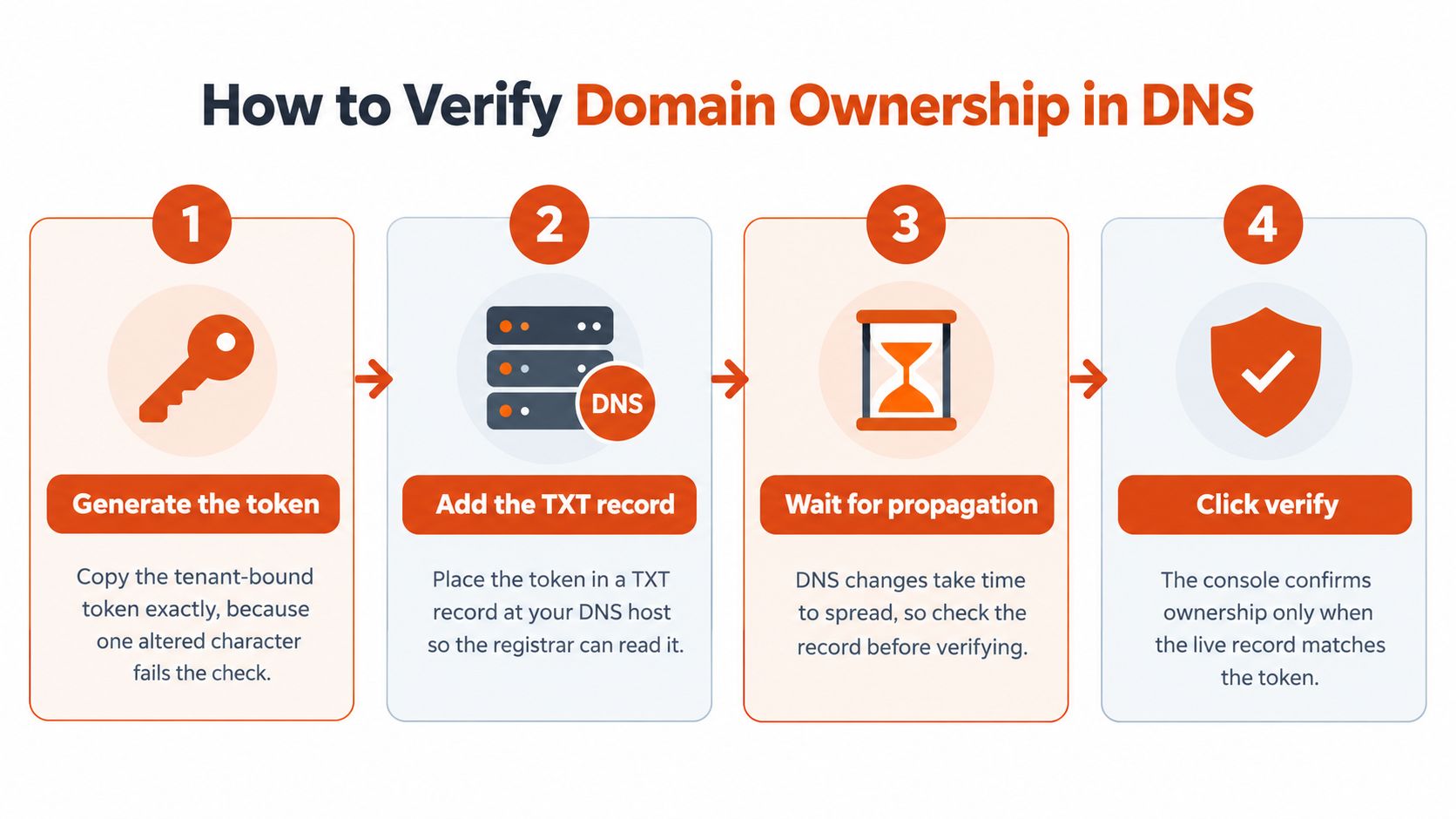
SSOJet's write-up of email-domain discovery describes a practical pattern for multi-tenant SAML and OIDC: generate a high-entropy token bound to the tenant, publish it as a public DNS TXT record, resolve it through public DNS, compare the value in constant time, then store the verification timestamp and tenant binding. Enable email-based tenant discovery only after this check passes.
- Generate the token in the SSO admin console and copy it exactly. A changed character will fail the comparison. Check for a trailing space from the clipboard.
- Use the label specified by the console. It may be the root domain or the exact subdomain used for routing. Query that label, not a related name.
- Add a new TXT record. Leave existing records used for mail and site verification untouched. Replacing them can disrupt those services.
- Lower the TTL before publishing, if the DNS host allows it. A long TTL can delay visibility of the new record.
- Query a public resolver. Office DNS may show an internal-only value that is invisible on the public internet. Confirm that the returned string matches the token before selecting verify.
- After verification, keep the TXT record in place and retain the timestamp. Removing the record after the console shows success leaves ownership unchecked until the next validation.
- Verify each subdomain separately. A parent-domain record does not automatically cover child domains. Some platforms also prevent a domain from being verified for more than one organisation.
Reject unverified and consumer email domains before allowing them to match a routing rule.
A correct record can remain unverified for minutes or take several days, depending on DNS caching and the provider. Wait for public DNS to return the expected value before creating another token. A second token or TXT record can make troubleshooting harder by leaving the console and DNS with different values.
The walkthrough below demonstrates publishing and checking a TXT record on a DNS host. It can help when a registrar's editor obscures the hostname field.
Treat verification as a renewable control. Revalidate the TXT record after ownership changes, including a registrar move or DNS-host migration. Keep the domain out of discovery until the new check passes.
How to Wire the IdP and Service Provider Together
After the domain is verified, it is only a routing key. The person is still unauthenticated until the IdP says so.
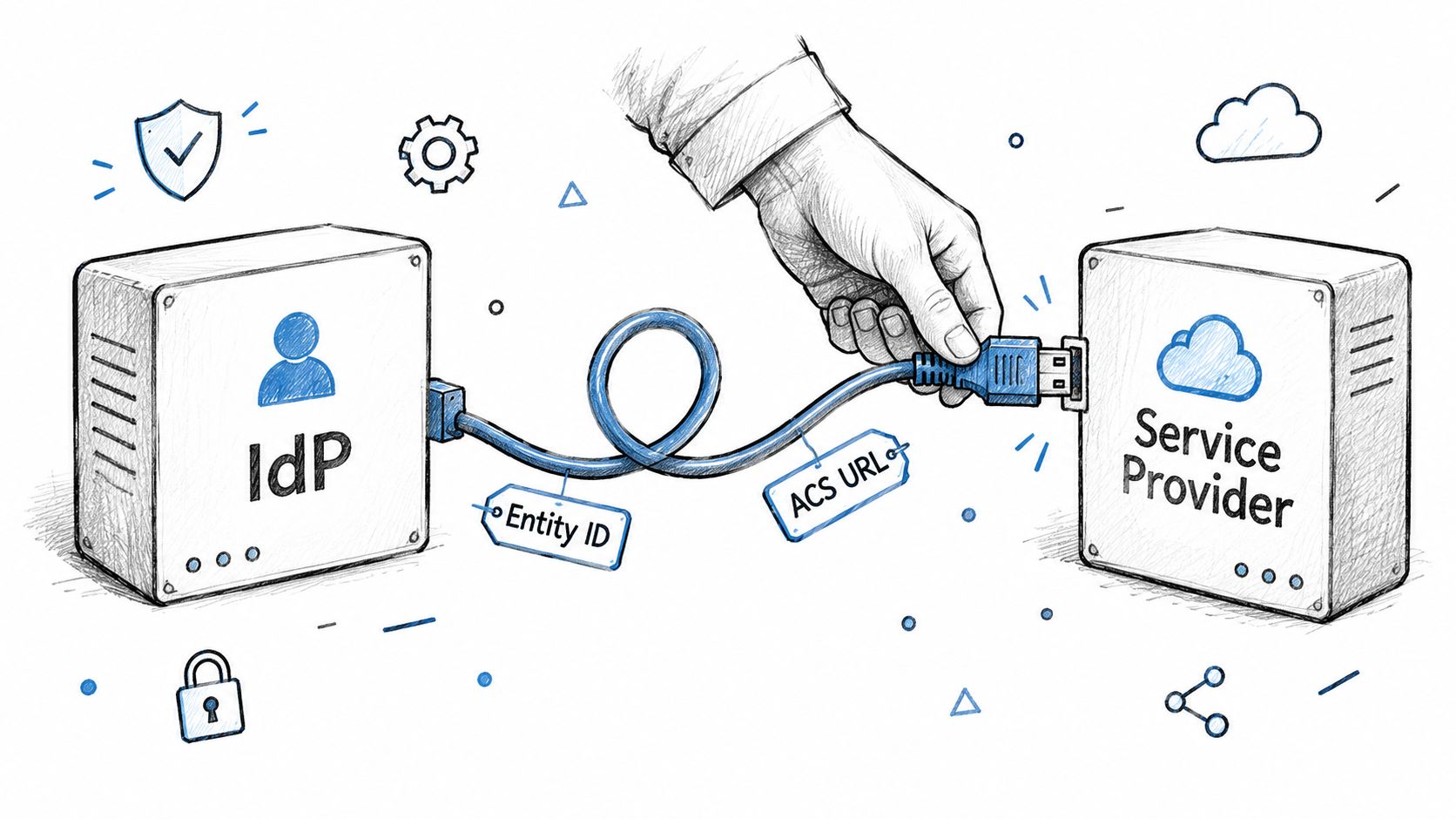
Build the trust in this order.
- Create the app in the IdP as SAML or OIDC, whichever the service provider supports. Do not enable both "just in case" unless you have two tested flows.
- Paste the entity ID or issuer, and the ACS URL or redirect URI, as exact strings. A trailing slash, a host alias, or a wildcard is enough to fail the request.
- Map the subject to an immutable identifier from the IdP, not the mailbox. Map groups or roles in the same pass, with an explicit claim, not an inferred address suffix.
- Turn on MFA and conditional access at the IdP. Once SSO is on, the app's own password policy no longer protects those users. Square's enterprise SSO guidance is explicit that MFA belongs at the identity-provider layer.
- Normalise the submitted email domain to lowercase, apply IDNA and Punycode handling, and strip trailing-dot ambiguity. Match that value exactly against the active verified-domain table, then select one tenant and one IdP.
- Re-check that the domain is still verified before every routing decision, then validate the protocol fields below.
| Check | SAML | OIDC |
|---|---|---|
| Identity of the IdP | Issuer and entity ID match the IdP metadata | Issuer matches the discovery document |
| Endpoint | ACS URL and recipient match exactly | Redirect URI matches exactly, with no wildcards |
| Signature | Assertion signature and certificate validity checked | ID-token signature verified against the published keys |
| Replay protection | Audience, NotOnOrAfter and InResponseTo checked | state and nonce checked on every login |
| Flow | SP-initiated flow with HTTP POST binding | Authorization-code flow with PKCE |
| Subject | Immutable NameID or attribute used as the key | sub claim used as the key, not the email |
Also check clock skew on the SAML assertion, and check that the OIDC access token's audience is this app. Those two failures look like "random" login errors and they are not random.
What actually crosses tenants
Naive suffix matching treats evil-acme.com as acme.com. A wildcard redirect URI lets a token land on a host you do not run. One verified domain mapped to several tenants sends the next user to whichever row the query returns first. Any of those can misbind an account even when DNS verification itself succeeded.
Do not authorize from an asserted email suffix. Require an IdP-controlled subject and a tenant membership check.
The same habit belongs next to the rest of your account controls. The notes on data security best practices are a useful place to park the subject-key and redirect rules so they are not only in one person's head.
Certificate and Clock Settings That Break Logins
When SSO works on Friday and fails for everyone on Monday, the usual cause is a signing certificate that expired, or a clock that drifted. The metadata you typed in last quarter is rarely the thing that changed overnight.
Run this list on the day you go live, and again at every renewal.
- Read the SAML signing certificate's expiry in the IdP and put the date on a calendar well before it lapses. Waiting for the first failed login means the overlap window is already gone.
- Import the new metadata while the old certificate is still valid. Both certificates should be accepted during that overlap. Cut over only after a test user succeeds on the new one.
- Check the TLS certificate on each service-provider endpoint. You want a complete chain and a name that matches the hostname the browser uses. A signing cert can be fine while the ACS host still presents an expired web certificate.
- Confirm both sides sync to NTP, and read the skew tolerance each side allows. That window is often only a few minutes. Assertions outside it are rejected as not yet valid or already expired.
- Re-import metadata after every rotation. An app that keeps the old certificate will trust signatures you no longer issue. An app that refuses the new one will fail closed for everyone.
If the error text mentions signature, trust, or NotBefore and the failure started on a certificate's expiry date, the signing certificate is the first suspect. Replace it. Disabling signature validation is not a fix, and it is not a temporary workaround either.
We have no SOC 2 or HIPAA compliance, and no procurement paperwork to hide behind, so the expiry date has to live in your own runbook. The same record-keeping habit is what SOC 2 compliance software is meant to organise. A badge does not rotate a certificate for you.
Fixing Common SSO Domain Failures
The ticket that arrives most often is verification stuck on pending. Query the TXT record at the exact label the console named, through a public resolver. If the token is missing, it is usually on the wrong label, or an older TXT record was overwritten when the token was added. Restore the previous records, add the token as its own record, and wait. Do not mint a new token until you have seen the current one in public DNS.
Other failures sort more cleanly once you separate "never verified" from "verified, but the protocol fields disagree."
| Symptom | Likely cause | Fix |
|---|---|---|
| Verification stuck on pending | Token at the wrong label or an existing TXT record overwritten | Query the exact label, restore the old TXT record, add the token as a new one |
| Users sent to password login | Subdomain not verified, or domain not mapped to a tenant | Verify each subdomain and map it to exactly one tenant |
| Invalid audience or issuer | Entity ID or issuer differs from IdP metadata | Copy the value from IdP metadata and re-import |
| Redirect URI mismatch | Wildcard, missing or extra trailing slash | Use the exact string registered in the IdP |
| Works for some users only | Mailbox domain differs from IdP domain | Use domainless federation or add the mailbox domain to the IdP |
Where to look first
Open the IdP sign-in log and copy the error code before you change anything. Audience and issuer mismatches are metadata problems. They clear in minutes once you paste the value from the IdP and re-import. A redirect URI mismatch is the same class of fix: delete the wildcard, match the slash, save.
A login that works for staff and fails for contractors is not a certificate problem. Their mailbox domain is not the domain the IdP was configured with. Domainless federation, or an explicit extra domain on the IdP, is the repair. String-suffix tricks are how you bind the wrong tenant.
When the IdP log is vague, capture the SAML response in a browser tracing extension and read issuer, audience, recipient, and NotOnOrAfter. Signature and clock errors point back to the certificate and NTP checks. DNS problems do not. If the public resolver still lacks the token, you are inside the propagation window described above, which can run for days. Escalating to the app vendor before that window ends mostly produces a second token and a worse TXT set.
A password-page redirect after a "successful" domain add almost always means the subdomain was never verified on its own, or it was verified and never mapped to a tenant.
Confirm Domain Ownership Before Switching Users
Do not move the company onto SSO because the console shows one green badge. Verification is a moment in time. A registrar transfer, an expiry, or a DNS-host move can drop the TXT record while the app still routes mail for that domain.
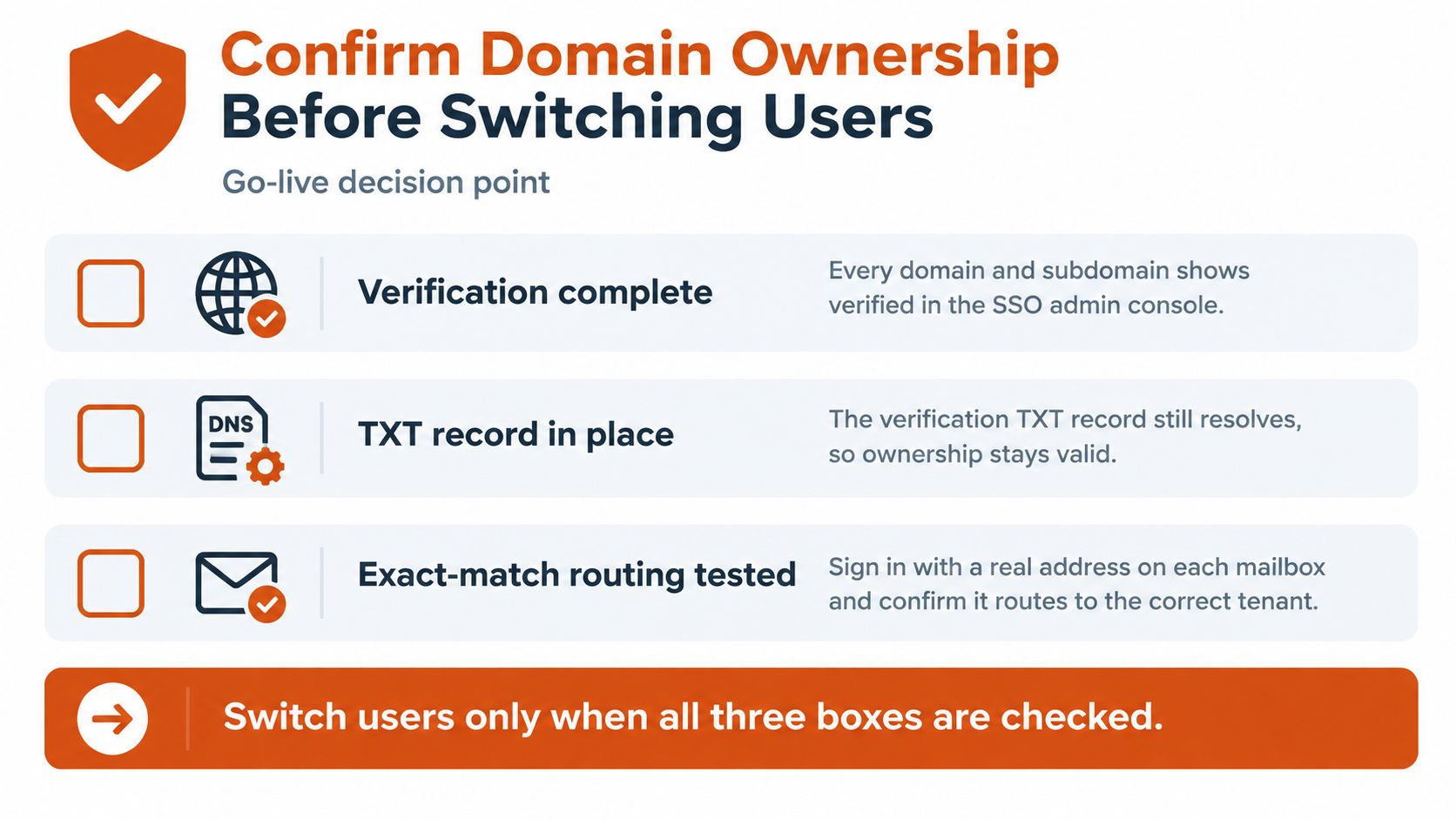
Switch users only when all of these are true.
- Verification complete: every domain and every subdomain you route shows verified.
- TXT record still published: you can resolve it on public DNS today, not only on the day you clicked verify.
- Exact-match routing tested: a real address on each mailbox domain reaches the correct tenant, and a lookalike suffix does not.
- MFA enforced at the IdP: conditional access is on for the SSO app.
- Certificate dates written down: signing and TLS expiries are on a calendar with an overlap plan.
- Break-glass path tested: a local admin account can still sign in if the IdP is down.
Treat the domain as a renewable credential
Ory's account-linking guidance makes the point most setup guides skip. Many explanations stop at "add your company domain and configure SAML," and they never say what happens when a domain expires, changes registrars, is sold, or loses its DNS records. A custom domain takeover can let an attacker receive verification emails, password resets, or account-linking messages. TXT verification proves control at setup. It does not prove you still have it next quarter.
Re-check on a schedule, quarterly is a reasonable default, and re-check immediately after a registrar change, a DNS migration, an acquisition, or any expiry scare. If the check fails, disable routing for that domain until it is restored. Subsidiaries, temporary project domains, schools, and healthcare vendors change mail ownership without anyone updating the SSO row.
Keep a short runbook, not a slide.
- Registration: who owns the name, where it is registered, and when it renews.
- Verification and re-verification: the token label, the last good check, and who runs the next one.
- Retirement: remove the routing row before you let the name lapse.
- Emergency rollback: a tested path back to password login, plus the local admin, so a bad certificate or a dead IdP does not lock the company out.
That runbook is the control. The green badge in the console is only the last time someone looked.
If you are writing that domain lifecycle runbook between tickets, AIDictation turns spoken notes into clean paragraphs you can paste into the change record. It is a practical way to capture certificate dates, rollback steps, and the exact domain list while the IdP console is still open. Open it and dictate the next SSO change instead of reconstructing it from memory later.
Frequently Asked Questions
What does SSO Domain Name Explained: Setup, DNS and Troubleshooting cover?
A company domain can pass verification on Thursday and still send staff to a password form on Monday. A registrar change, expired registration, or altered DNS record can break the proof of control after setup.
Who should read SSO Domain Name Explained: Setup, DNS and Troubleshooting?
SSO Domain Name Explained: Setup, DNS and Troubleshooting is most useful for readers who want clear, practical guidance and a faster path to the main takeaways without guessing what matters most.
What are the main takeaways from SSO Domain Name Explained: Setup, DNS and Troubleshooting?
Key topics include Table of Contents, What an SSO Domain Name Means in Practice, Choosing the Right Domain Layout.
Ready to try AI Dictation?
Experience fast voice-to-text on your device. Free to download.
Download Free