Dragon Dictation Cost: Uncover Real Pricing & Alternatives

Most advice on dragon dictation cost starts with the list price. That's the wrong starting point for a business buyer.
A procurement decision lives or dies on total cost of ownership, not on the number attached to a product page. That matters even more outside healthcare, where most Dragon pricing coverage is thin. Existing coverage heavily focuses on medical editions like Dragon Medical One, while non-medical professionals such as software developers and product managers are underserved in TCO analysis, leaving a real gap for buyers evaluating non-clinical ROI, as noted by DictationOne's Dragon Professional Anywhere listing discussion.
For a clinician replacing outsourced transcription, Dragon can be easy to justify. For a Mac-based product team, the same purchase can look very different once you include setup fees, hardware, operating system constraints, and workflow friction. If you're still evaluating the basics of speech-to-text before comparing business tools, this overview of free voice to text options is a useful primer.
Table of Contents
- How to Budget for Dragon Dictation in 2026
- Dragon Dictation Pricing Models Explained
- The Hidden Costs and Total Cost of Ownership
- Real World Cost Per Use for Professionals
- A Cost Benefit Analysis of Modern Alternatives
- Making the Right Choice for Your Dictation Needs
How to Budget for Dragon Dictation in 2026
If you're budgeting for Dragon by copying the advertised license or subscription fee into a spreadsheet, you're underbudgeting.
The popular framing treats dictation software like a simple app purchase. In practice, Dragon often behaves more like a small software deployment. The financial difference between those two views is large, especially for teams that don't fit the classic medical transcription replacement model.
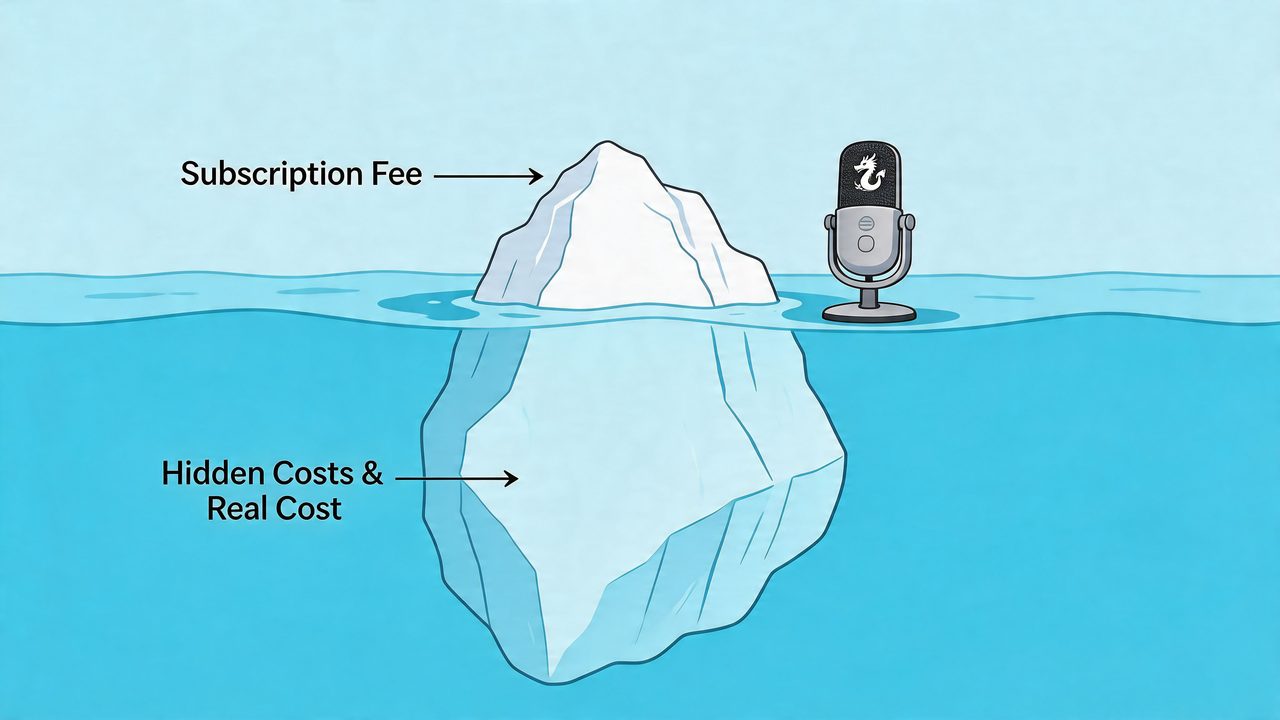
A realistic budget has to separate sticker price from operating reality. For procurement, I would break dragon dictation cost into four buckets:
- Software charges. Subscription fees, one-time license costs, and any mandatory setup.
- Platform fit. Whether your team already works on supported hardware and operating systems.
- Implementation friction. Time spent getting users productive, not merely installed.
- Workflow economics. Whether the software replaces an existing paid process or changes how employees create documents.
That last point is where many buyers make the wrong comparison. In medical settings, Dragon often replaces outsourced transcription directly, so the ROI can be obvious. In product, engineering, support, or general knowledge work, there usually isn't a transcription invoice to eliminate. The benefit comes from faster drafting, cleaner notes, and less context switching. Those gains can be real, but they are harder to quantify and easier to overestimate.
Budget rule: treat Dragon as a workflow investment, not just a software line item.
For non-medical professionals, that distinction is the whole story. A software developer on macOS and a clinician in a Windows-based practice may both use dictation, but they are not buying the same economic outcome. One is replacing a billable external service. The other is trying to improve internal productivity without creating new IT overhead.
Dragon Dictation Pricing Models Explained
Dragon pricing creates procurement risk because the product family mixes retired desktop licensing logic with newer subscription and reseller-led models. For a non-medical buyer, the first task is not finding the cheapest tier. It is identifying which commercial model you are being asked to buy, and whether that model fits a modern Mac or mixed-device workplace.
Perpetual licenses versus subscriptions
Historically, Dragon has been sold in two different ways. Some editions used a one-time desktop license. Others shifted to recurring monthly or annual fees, especially for mobile, cloud, and industry-specific deployments.
That distinction affects more than accounting treatment. A perpetual license can look efficient if a team standardizes on supported hardware, expects a long deployment life, and does not need frequent vendor-managed updates. A subscription changes the economics. It lowers the initial commitment, but it also turns speech recognition into an ongoing operating cost that must keep proving its value every month.
For non-medical professionals, that tradeoff is often misunderstood. A law firm or hospital may tolerate a more complex commercial structure because dictation is tightly tied to billable workflows. A product team, consultant, recruiter, or analyst usually needs something simpler. They want predictable cost, fast rollout, and native support for the systems they already use.
A practical pricing baseline
A useful way to read Dragon's lineup is by buying motion rather than by brand name.
| Product Version | Target Audience | Pricing Model | Estimated Cost (USD) |
|---|---|---|---|
| Dragon Home | General consumers | Perpetual license | Around $200 |
| Dragon Professional Individual | Business professionals | Perpetual license | Around $699 |
| Dragon Legal | Legal professionals | Perpetual license | Around $799 |
| Dragon Anywhere | Mobile dictation users | Subscription | Monthly or annual subscription |
| Dragon Medical One | Healthcare professionals | Subscription plus implementation | Varies by plan and setup structure |
| Dragon Professional Anywhere | Business users needing cloud-hosted access | Subscription plus implementation | Pricing varies by reseller structure |
The table shows a pattern that matters for budgeting. The easier products to price are the older desktop editions. The harder products to price are the ones many businesses now prefer operationally, namely cloud-hosted and managed deployments.
That creates a practical tension. The editions with the simplest sticker price are not always the ones that fit current IT standards, especially for organizations with macOS users, remote staff, or centralized device management. By contrast, the editions that align better with managed deployment often require quote-based buying, reseller involvement, or added services that make comparison harder.
For teams weighing Dragon against newer tools, this side-by-side comparison of Dragon and macOS-friendly alternatives is a useful starting point because it frames the decision around platform fit and workflow, not brand familiarity.
If procurement cannot explain whether the proposed Dragon product is a one-time desktop purchase, a recurring SaaS commitment, or a reseller-packaged service, the price review is incomplete.
That is a core pricing issue. Dragon does not present one cost model to the market. It presents several, and the wrong one can raise total spend even before hardware, support, and adoption enter the equation.
The Hidden Costs and Total Cost of Ownership
Sticker price is often the least useful number in a dictation software review.
For non-medical professionals, the primary question is whether Dragon lowers the cost of producing work across a full device and support cycle. In many cases, the answer depends less on the license itself and more on the extra systems the software assumes you already have.
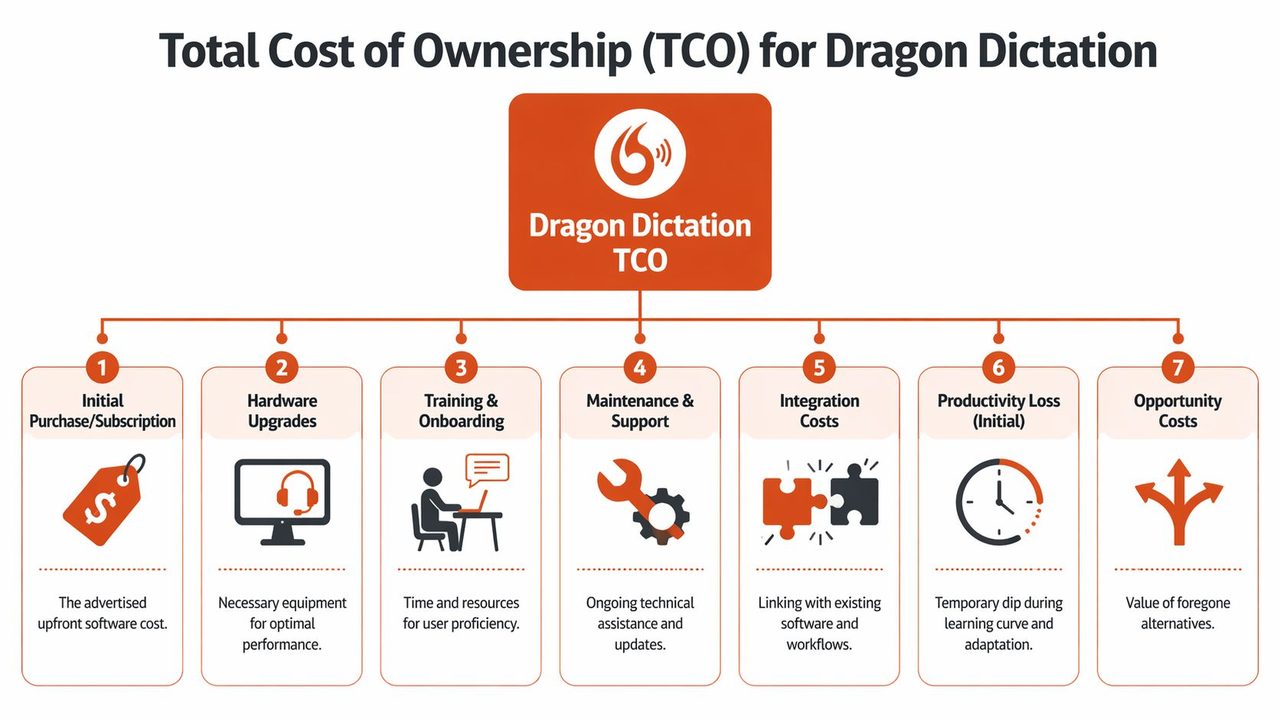
Why first-year cost understates real spend
A visible subscription or license fee captures only the entry point. Actual ownership cost begins at deployment.
For Dragon Medical One, Dictation Daddy's Dragon Medical cost analysis describes a pricing structure that includes a $525 implementation fee and a $99 monthly subscription, bringing the first-year spend to $1,713 per user before hardware or environment changes. The same analysis argues that hardware and operating system adjustments can materially raise that total over time.
That pattern matters beyond healthcare. An onboarding fee changes the economics because the business pays before the user proves sustained adoption. If usage remains low after rollout, that upfront spend becomes a sunk cost rather than a productivity investment.
Hardware is the second layer of TCO. The same source cites professional microphones in the $200 to $800 range and notes that system requirements can trigger device changes. Those purchases are easy to dismiss during approval because they may sit in different budgets. They still belong in the same model.
A third cost is harder to measure but often larger. Support hours.
When a dictation product requires setup, profile tuning, peripheral testing, and exception handling across different applications, IT and operations teams absorb labor that never appears on the software invoice. For a solo professional, that burden shows up as lost billable time. For a team, it appears as help desk load and slower rollout.
The Windows tax for Mac-based teams
Here, Dragon's fit with non-medical knowledge work weakens.
Dragon Professional remains tied to a Windows-based deployment model, as noted earlier. For law firms, consultants, product teams, writers, recruiters, and executives working primarily on macOS, that creates a separate cost category. The software may be usable, but not native. Procurement should price the workaround, not just the app.
A Mac user who adopts Dragon may need a Windows environment, a virtualization tool, more memory, and extra support to keep the setup stable inside everyday workflows such as email, documents, browser-based tools, and meeting apps. Each item is modest in isolation. Together they change the business case.
That is the gap many buyer guides miss. They evaluate Dragon as if every professional works on a standard Windows desktop with centralized support and a heavy dictation workload. Non-medical users often do not. Their usage is lighter, more intermittent, and spread across many applications. In that setting, friction matters more because the software has fewer chances each day to earn back its cost.
By contrast, a macOS-native product such as AIDictation avoids part of this cost stack at the start. There is no separate Windows layer to buy, maintain, or explain to users. That does not automatically make it cheaper in every case, but it reduces the number of variables that can push ownership cost above plan.
If a dictation tool requires a Mac-based employee to change operating system behavior just to capture routine work, the compatibility issue has become a procurement issue.
What belongs in a real TCO model
A useful TCO model for Dragon should include five categories:
-
Software cost
License or subscription, plus any onboarding or implementation fee. -
Equipment cost
Microphones, headsets, RAM, storage, or device replacement tied to deployment. -
Platform cost
Windows access, virtualization, or other tools required for unsupported environments. -
Support cost
Internal IT time, user troubleshooting, vendor coordination, and rollout management. -
Utilization risk
The chance that users dictate less often than planned because setup or workflow friction gets in the way.
The fifth category is the one buyers underrate. If a lawyer, analyst, or manager uses dictation only occasionally, a small amount of friction can cut usage enough to erase the expected productivity gain. At that point, a lower sticker price no longer means lower cost.
For non-medical professionals, total cost of ownership is therefore a platform-fit question first and a pricing question second. Dragon can still make sense in Windows-centered environments with high dictation volume. For mixed-device teams, especially Mac-heavy ones, the cheaper-looking option can become the more expensive one once support, workarounds, and underuse are included.
Real World Cost Per Use for Professionals
Cost becomes easier to judge when you attach it to a person with a real workflow.

Dr. Evans in a small practice
Dr. Evans is the easiest case for Dragon to justify. She dictates clinical letters every day and currently pays for manual transcription. In that environment, the economics are unusually direct.
Verified pricing from Voice Recognition Australia puts Dragon Medical One at approximately $1,490 AUD for the first year including GST, with subsequent years at $1,500 AUD annually, and also notes an alternative structure of $79 per month per user plus a $525 one-time setup fee, or a 3-year prepaid subscription at $2,844 USD plus $525 implementation. The same source states that a practice dictating 20 to 30 letters daily can reach ROI in 10 to 15 days, and that for an average practice the product can save over $22,000 per year compared with manual transcription costs of $10 to $14 per dictation, making Dragon 10 to 15 times cheaper than manual methods.
For Dr. Evans, the software cost is not the primary consideration. The avoided transcription bill is. This is why healthcare content about Dragon often sounds enthusiastic. In the right clinical workflow, the return can be obvious and fast.
Priya the Mac-based developer
Priya works on a MacBook Pro. She wants dictation for design docs, code comments, technical tickets, and occasional meeting summaries. She does not outsource transcription today. That means there is no direct expense to eliminate.
Her financial question isn't "Will dictation cost less than my transcription vendor?" It is "Will dictation improve my output enough to justify the software stack and friction?" If Dragon requires a Windows-only environment and an added virtualization layer, Priya is paying for compatibility before she gets any productivity benefit.
That changes the cost-per-use logic. A clinician may use Dragon continuously in a documentation-heavy workflow. Priya may use it in bursts. When use is intermittent, every bit of setup friction matters more.
The same software can have strong ROI in a clinical documentation workflow and weak ROI in technical knowledge work, even if both users like dictation.
Mark the product manager
Mark dictates stakeholder updates, writes PRDs, and captures notes after meetings. His workflow depends on speed, but also on clean formatting and low switching overhead. If he can speak rough notes and get usable prose, a dictation tool helps. If he has to manage a separate environment, fix formatting manually, or remember custom setup steps, adoption drops.
Many business purchases fail. The tool isn't bad. It just doesn't fit the user's working context closely enough.
For Mark, the best economic choice is the one that gets used repeatedly with the least operational drag. A procurement team that looks only at list price can miss that entirely. In practice, frequency of use multiplied by workflow fit determines value more reliably than the headline subscription number.
A Cost Benefit Analysis of Modern Alternatives
The strongest alternative to Dragon is often the tool with fewer features.
That sounds counterintuitive until you evaluate dictation the way a procurement team should. For non-medical professionals, value usually comes from lower deployment cost, faster adoption, and cleaner fit with existing devices. A tool that is slightly less configurable but gets used can produce better economics than a more established product that carries setup overhead.
Dragon still has a rational place in the market. It fits best where organizations already run Windows at scale, have documentation-heavy workflows, and can spread training and configuration costs across frequent daily use. In those environments, a heavier product can still be efficient because the fixed overhead is diluted over a large volume of dictated work.
The non-medical buyer often has a different profile. A product manager, consultant, founder, recruiter, or developer usually wants to capture ideas, meeting notes, emails, and drafts inside the tools already open on their machine. That changes the benchmark. The question is less about maximum dictation horsepower and more about whether the software creates usable text with minimal operational drag.
Modern macOS-native options change the comparison because they remove categories of cost rather than trimming the license fee alone. If the tool runs natively on the user's existing device, the business may avoid virtualization, separate IT support, and the soft cost of teaching people a workaround. Those savings matter more for intermittent users than marginal improvements in peak dictation speed.
A practical comparison looks like this:
| Evaluation factor | Dragon-centric view | Modern native alternative view |
|---|---|---|
| Core procurement logic | Buy for feature depth and established enterprise use | Buy for workflow fit and lower operating overhead |
| Platform fit | Best where Windows is already standard | Best when matched to the team's actual OS, especially Mac |
| Cost structure | License or subscription plus possible support and compatibility spend | Often simpler monthly or annual pricing with fewer add-ons |
| Adoption risk | Higher if setup requires behavior change or extra environment management | Lower if users can start inside familiar apps |
| Output quality requirement | Strong for structured, high-volume documentation | Strong enough for daily professional writing, with AI cleanup often adding value |
| Best fit | Legal, healthcare, and legacy enterprise documentation | Knowledge workers, mixed-device teams, and smaller businesses |
The AI layer also changes the benefit calculation. Older procurement logic treated speech recognition and editing as separate steps. Newer products increasingly combine transcription with formatting, cleanup, and rewriting. For a non-medical team, that can reduce the time spent turning rough dictation into client-ready text. The cost advantage comes from fewer manual edits, not just from converting speech to words.
This is why modern alternatives can outperform Dragon on TCO even when Dragon remains the better-known brand. The buyer is not paying only for recognition quality. The buyer is paying for compatibility, rollout effort, user adoption, and post-dictation editing time. In a Mac-heavy or mixed-device company, those non-license costs can dominate the decision.
If you want a broader vendor comparison, this guide to Dragon dictation alternatives for Mac and modern business workflows is a useful starting point.
The procurement conclusion is straightforward. Dragon can still be the right answer for high-volume, structured documentation in compatible environments. For many non-medical professionals, especially on macOS, a native alternative often delivers better value because it reduces total system cost, not because it wins a feature checklist.
Making the Right Choice for Your Dictation Needs
The right purchase depends less on brand reputation than on workflow economics.
Choose Dragon when your organization already lives in a compatible environment, documents at high volume, and can justify onboarding cost through direct operational savings. That profile is common in healthcare, legal work, and established Windows-based enterprises. In those settings, Dragon can still be a rational procurement decision.
Be more skeptical when you're buying for developers, product managers, support staff, founders, or general knowledge workers, especially on Mac. Those users rarely need a heavyweight deployment. They need fast capture, clean output, low friction, and pricing that won't expand after procurement signs the order. In that environment, the advertised dragon dictation cost is often the least important number.
A simple framework helps:
- Pick Dragon if you need legacy workflow alignment and your savings are tied to replacing an existing documentation cost.
- Pick a modern native alternative if your team values platform fit, privacy options, predictable pricing, and low setup burden.
- Pilot before rollout when the benefit depends on user behavior rather than direct cost replacement.
The conclusion is straightforward. For many non-medical professionals, Dragon isn't too expensive because of the list price. It's too expensive because the total cost of ownership can exceed the value of the workflow improvement it delivers.
If you want a dictation tool built for modern Mac workflows, AIDictation is worth a close look. It offers a free tier, supports on-device and cloud modes, and is designed to turn spoken drafts into clean writing without the platform workarounds that often drive up Dragon's real cost.
Frequently Asked Questions
What does Dragon Dictation Cost: Uncover Real Pricing & Alternatives cover?
Most advice on dragon dictation cost starts with the list price. That's the wrong starting point for a business buyer.
Who should read Dragon Dictation Cost: Uncover Real Pricing & Alternatives?
Dragon Dictation Cost: Uncover Real Pricing & Alternatives is most useful for readers who want clear, practical guidance and a faster path to the main takeaways without guessing what matters most.
What are the main takeaways from Dragon Dictation Cost: Uncover Real Pricing & Alternatives?
Key topics include Table of Contents, How to Budget for Dragon Dictation in 2026, Dragon Dictation Pricing Models Explained.
Ready to try AI Dictation?
Experience fast voice-to-text on your device. Free to download.
Download FreeRelated Posts
Email Dictation Software: What It Is and How to Choose
Learn what email dictation software is, how it works, and how to pick the right one. Covers accuracy, privacy, HIPAA, accents, and real buyer checklists.
Verbal Ink Transcription Workflows Today
Explore verbal ink transcription workflows, accuracy benchmarks, and how modern AI dictation tools compare to traditional human transcription services.
Apple Voice Recognition Software: Key Pros and Cons
Learn how Apple voice recognition software turns speech into text on your device, where it excels, and what tasks still challenge it in 2026.